
Extracting bibliographic records from Index Translationum with Python
The second part of the Fetching Index Translationum post

In a previous post UNESCO’s Index Translationum has been described. It doesn’t have an API, but we can do “web scraping”, i.e. parsing the HTML source code, and transform it into some form that is more convenient in data analysis. The post described the HTML structure. In this post one possible implementation will be explained. We will use Python for that.
The workflow is something like this:
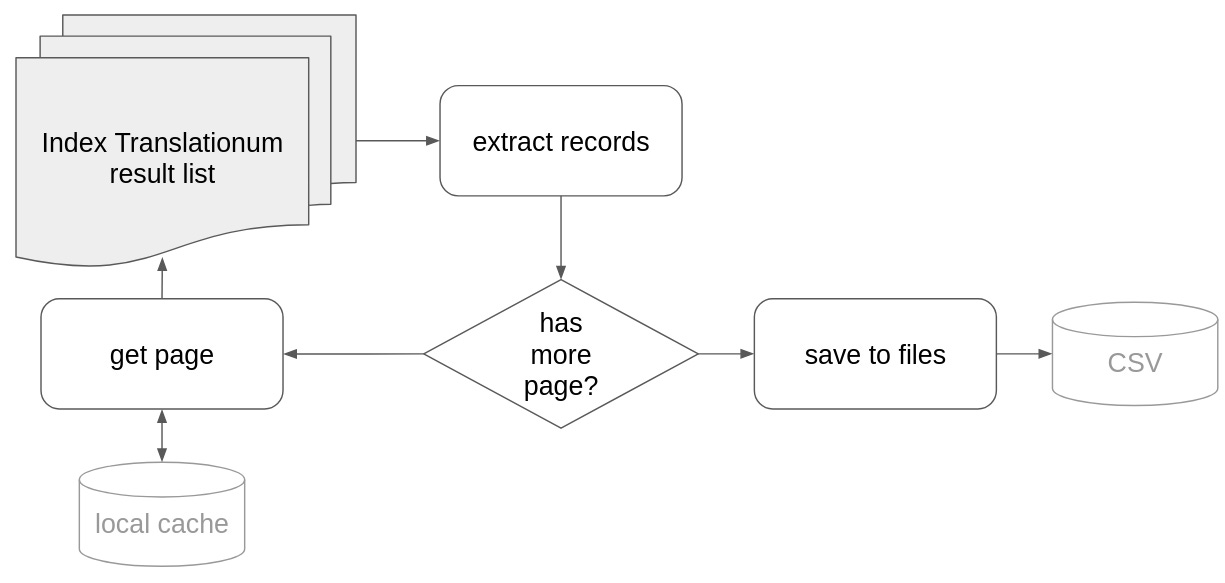
The script should iterate over the hit list pages, extract records for each, and then to save the result somewhere (in our case into CSV files). Let’s get started with coding!
import requests                                                                      # <1>
import lxml.html                                                                     # <2>
import os
import re                                                                            # <3>
import urllib.parse                                                                  # <4>
import csv                                                                           # <5>
from collections import Counter                                                      # <6>
We use another URL handling library: the request library that provides more convenient methods for the same task as the urllib package. The request package needs installation with a
pip install request.in the OAI-PMH post we used a(nother) module from the
lxmllibrary.lxml.htmlprovides methods for parsing HTML files.reprovides regular expression functionalities. As this part of core Python, it doesn’t need installation.The parse module helps to parse URLs and extract important parameters
The csv module helps in reading and writing CSV files.
Counter, well it is counting things
We define two variables for our URL requests.
base_url = 'https://www.unesco.org/xtrans/bsresult.aspx'
it_params = {
    'a': 'Bourdieu, Pierre',
    'fr': 0
base_url is part of the URL we always use in the requests. To retrieve the second and any following pages of the hit list we should change the rest of the URL, the so-called query part (after the question mark). It is a list of key=value pairs separated by ampersand (&) character. We set up the it_params variable, which represents the URL query. This is a dict data type, and will be automatically transformed to URL during the request.
We should do some more preparation. When we parse HTML pages the process is almost always iterative, because we usually move forward with baby steps adding new and new parts to our script. In practice it means that we fetch the website many times -- that might cause problems on the data provider’s web site. A best practice is to be nice to them, and try to eliminate the number of requests by caching: when we first retrieve a page, we should store it locally as a file in our disk, and next time we read it from the disk.
Create a new function to create a directory if it does not yet existing:
mport os
...
def create_dir(dir):
    """
    Create a directory if it doesn't yet exist

    :param dir: the directory name
    """
    if not os.path.exists(dir):
        os.makedirs(dir)
Then we use it in the web scraping script:
create_dir('cache')                                                                  # <1>
cache_dir = os.path.join('cache', 'it')                                              # <2>
create_dir(cache_dir)
creates a directory called ‘cache’
defines a directory called
itinside thecachedirectory. Different operating systems handle subdirectories differently,os.path.joinprovides a safe way to use the appropriate syntax.
We also have to create containers for the data we plan to extract.
records = []                                                                         # <1>
authors = []                                                                         # <2>
translators = []
record_counter = 1                                                                   # <3>
field_names = Counter({}) # <4>record(a list of dictionaries) will contain our records.as there might be multiple authors, and translators, we collect them separately. Records will have an
idfield (IT does not provide one), and these two entities will refer to that identifier as the external keys in relational databases.record_counter is the source of this identifier. When we process a new record, we will increment this value
during the development we do not always know each field beforehand. Counter is a special Python data type that provides us a method to count things.
We start the process with the initial values:
request_page(it_params)that triggers the following:
def request_page(it_params):
    cache_file = os.path.join(cache_dir, f'results_{it_params['fr']}.html')          # <1>
    if os.path.exists(cache_file):                                                   # <2>
        with open(cache_file, 'r') as f:                                             # <3>
            content = f.read()
        process_page(content)
    else:
        response = requests.get(base_url, params=it_params)                          # <4>
        if response.status_code == 200:                                              # <5>
            content = response.text                                                  # <6>
            if re.search('The requested URL was rejected.', content) is None:        # <7>
                with open(cache_file, 'wb') as f:                                    # <8>
                    f.write(response.content)
            process_page(content)                                                    # <9>
defines the cache file name out of the current URL’s
frparameter (the offset of the first record in the page from the first record in the hit list).checks if the cache file already exists
if it does, the content should be read from the file, then process it with process_page() method.
otherwise we should request the page from the IT server
if it returns with HTTP status code 200 -- which means the communication went well
extracts the content
however, the IT web server also returns code 200 even though there are some errors, for example if we issue too many requests (which is now prevented by the caching mechanism). During the development we met only one error message. re.search(pattern, string) returns mathing objects if pattern is found in the string, otherwise it returns None.
if it doesn’t find the error message, the content will be saved to the cache file.
processes it with process_page() method.
def process_page(content):
    doc = lxml.html.fromstring(content)                                              # <1>
    extract_translations(doc)                                                        # <2>
    from_param = extract_next_link(doc)                                              # <3>
    if from_param != None:                                                           # <4>
        it_params['fr'] = from_param                                                 # <5>
        request_page(it_params)                                                      # <6>
the lxml library parses the document into an internal object
extract_translations() method will use it to extract the records from this object
extract_next_link() method extracts the above mentioned from (
fr) parameter from the “next” link on the page.if it is not None… (in other words: if there is a “next” link)
updates the parameter holder
and calls request_page() to process the next page.
So these two functions call each other until there is a “next” link on the page.
def extract_translations(doc):
    global record_counter, authors, translators                                     #  <1>
    items = doc.findall('body/table[@class="restable"]/tr/td[@class="res2"]', {})   #  <2>
    for item in items:
        record = {'id': record_counter}                                             #  <3>
        spans = item.findall('span')                                                #  <4>
        for span in spans:
            key = span.get('class')                                                 #  <5>
            if key == 'sn_pub':                                                     #  <6>
                subs = span.findall('span')
                for sub in subs:
                    extract_key_value(record, sub)                                  #  <7>
            else:
                extract_key_value(record, span)                                     #  <8>
        record, record_authors, record_translators = normalize_record(record)       #  <9>
        records.append(record)                                                      # <10>
        authors += record_authors                                                   # <11>
        translators += record_translators
        record_counter += 1                                                         # <12>
the method uses some global variables, we make it possible with the
globalkeywordextracts individual table cells with an XPath expression (explained above). For each HTML snippet...
creates a dictionary for the record structure, initially only with the identifier
all the important data elements are in
<span>elements, so we have to find extract them (inside the current cell), and iterate over themthe semantic information is found in the class attribute, so we should save it
however there is a special span:
sn_pubis a container of other spans, and we have to run a second iteration to extract its childrenand 8. at the end we call the extract_key_value() method with the record structure and the current (non complex) span element. It extracts the value and stores it in the record
ditto
after processing all spans we should normalize the record with the normalize_record() method. It returns the normalized method, the list of authors, authors and translators
as record is a single dictionary it can be appended easily to the list of records
however as authors and translators are list of dictionaries, append() can not be used here, we should concatenate the lists
increases the record counter by one
def extract_key_value(record, span):
    key = re.sub(r'^sn_', '', span.get('class'))                                     # <1>
    if key not in ['auth_name', 'auth_firstname', 'transl_name', 'transl_firstname']:# <2>
        field_names.update([key])
    if key not in record:                                                            # <3>
        record[key] = []
    record[key].append(span.text)                                                    # <4>
the key of the field is derived from the class attribute, but the
sn_string from its beginning should be removed with a regular expression. re.sub has three mandatory parameters: pattern, replacement and the input string.^is a building block of regular expressions, meaning the beginning of the string, so it will not match same string elsewhere (see the full syntax here)author and translator names will be stored in a distinct table, but we count how many times the rest appear in the pages.
we expect that each field is repeatable, so if the key is not available in the dictionary, we initialize it as a list
and append the value (the text attribute of the span) to this list
def extract_next_link(doc):
    next = doc.findall('body/table[@class="nav"]/tr[1]/td[@class="next"]/a', {})     # <1>
    if len(next) > 0:                                                                # <2>
        link = next[0].get('href')                                                   # <3>
        parsed_link = urllib.parse.urlparse(link)                                    # <4>
        parameters = urllib.parse.parse_qs(parsed_link.query)                        # <5>
        if 'fr' in parameters and len(parameters['fr']) == 1:                        # <6>
            return parameters['fr'][0]                                               # <7>
    return None                                                                      # <8>
extracts the “next” link
it is not available on the last page, so it should be checked if it is processable
the fr parameter is available in the href attribute of the first (and only) “next” link
parses it with the urllib’s method, that returns a fixed structure: 6-item named tuple.
its element query contains only a string, which should be parsed with parse_qs
the keys in the query string are repeatable, and parse returns a dictionary. Make sure that the parameters you look for is available and has only one value
returns the first (and only) fr value
in every other cases returns a special value: None (not above we had a check on this None)
As mentioned above there are two things we should improve in the extracted record structure:
we would store the author and translators in distinct CSV files (and we will join tables only during data analysis)
the values of the other fields are also lists, however we do not necessary need them as list, and in CSV it is not easy to handle lists in cells
def normalize_record(record):
    for key, value in record.items():                                                # <1>
        if key not in ['auth_name', 'auth_firstname', 'transl_name',
                       'transl_firstname']:                                          # <2>
            record[key] = ', '.join(value)                                           # <3>

    authors = extract_names(record, 'auth_name', 'auth_firstname')                   # <4>
    translators = extract_names(record, 'transl_name', 'transl_firstname')

    return record, authors, translators                                              # <5>
iterates over the key-value pairs of the dictionary
if the key is not one of the author and translator name related field
“flatten” it by concatenate the value with comma (and space)
handles author and translator names with the extract_names() method, that returns the list of authors, and the list of translators
returns the cleared record, and the two name lists
The extract_names() method however is not that simple as it seems to be. There are two problems.
in HTML we have sequences of last name, first name pairs, while our structure collects all last names and first names in distinct lists
sometimes the first name pair is missing. It would not be the problem if it would be the last element, but there are cases when an ‘et al.’ (as last name) takes place in the middle of the list. Because of this problem we can not use the otherwise handy built-in zip function, that creates tuples out of the pairs.
def extract_names(record, lastname_key, firstname_key):
    name_records = []                                                               #  <1>
    i = -1                                                                          #  <2>
    if lastname_key in record:                                                      #  <3>
        firstnames = record.get(firstname_key, [])                                  #  <4>
        for name in record.get(lastname_key):                                       #  <5>
            name_record = {'rid': record['id'], 'last': name, 'first': None}        #  <6>
            if name != 'et al.':                                                    #  <7>
                i += 1                                                              #  <8>
                if (len(firstnames) > i):                                           #  <9>
                    name_record['first'] = firstnames[i]
            name_records.append(name_record)

        del record[lastname_key]                                                    # <10>
        if len(firstnames) > 0:                                                     # <11>
            del record[firstname_key]

    return name_records
creates an empty list for the names
initializes a counter with -1, because 0 is the index of the first element in a list and we will increase it before using it
sometimes translators are missing from the records, so we check if we should process it at all
the first name is also missing sometimes, so we get an empty list if this is the case. If we would not add the default parameter, we would retrieve None instead which is not iterable, and raises errors when we check the length later.
iterates over the last names
creates a dictionary with None as the default first name that will be updated if there is a real first name
‘et al.’ does not have first name, so we can skip it
in every other case it increases our counter
if there is a corresponding first name by the index it updates the dictionary with that value. At the end of the check the current name will be appended to the list of names.
as we do not need it any more in the main record structure, we delete the last name
and the first name as well if it exists at all.
What remained is to save the extracted data into CSV files:
create_diroutput_dir = os.path.join('raw-data', 'it')
create_dir(output_dir)

output_file = os.path.join(output_dir, 'it.csv')                                     # <1>
with open(output_file, 'w', encoding='utf-8') as csv_file:
    column_names = ['id'] + list(field_names.keys())                                 # <2>
    output_writer = csv.DictWriter(csv_file, fieldnames=column_names)                # <3>
    output_writer.writeheader()                                                      # <4>
    output_writer.writerows(records)                                                 # <5>

column_names=['rid', 'last', 'first']                                                # <6>
names = {'authors.csv': authors,                                                     # <7>
         'translators.csv': translators}
for file_name, data in names.items():                                                # <8>
    output_file = os.path.join(output_dir, file_name)                                # <9>
    with open(output_file, 'w', encoding='utf-8') as csv_file:
        output_writer = csv.DictWriter(csv_file, fieldnames=column_names)
        output_writer.writeheader()
        output_writer.writerows(data)
opens a CSV file raw-data/it/it.csv using the safe os.path.join function
the column names are ‘id’ and the names we extracted from the class attributes
CSV writer’s API is similar to other file writers in Python. The csv library provides a number of functions, here we use the DictWriter that allows us to turn the list of dictionaries to CSV. It has two mandatory parameters: the file handler and the list of field names. All keys in the dictionaries should be available in the field name list, however they might be missing values in the records. E.g. if “location” is a key in the record dictionary, the field name list must contain it, but not every record should have the “location” key.
writes out the header line to the CSV file
writes out the individual records
repeats the same process for authors and translators, but here we give a fixed field name list, and not extract it from the HTML.
creates a dictionary for enabling the iteration. Its keys will be used as file names and the values are the name lists.
items() on a dictionary iterates over its key-value pairs -- we can name them anyhow.
the rest is very similar to the first CSV writing process.
The full script is available in Github. The Intra-Belgian literary translations since 1970 (BELTRANS) project of KBR (the Belgian National Library) provides a more elaborated approach to the same problem in their Github repository -- thanks to Sven Lieber for the pointer.